Exhibit 1 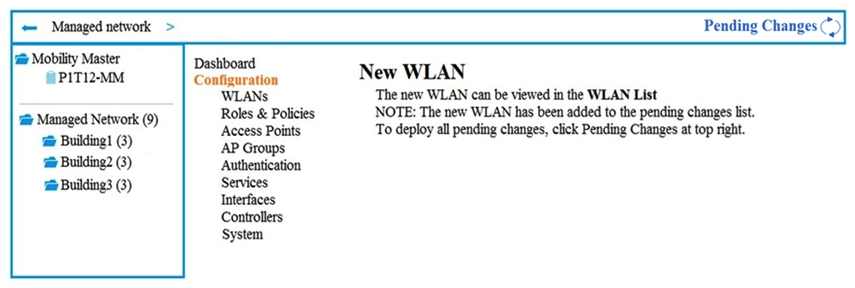 Exhibit 2
 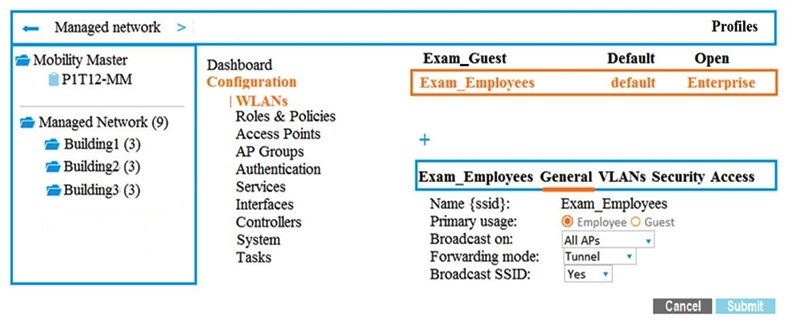 A company has an Aruba Mobility Master (MM) -based solution and needs a new WLAN for the corporate campus. A network administrator completes the creation of this WLAN, as shown in Exhibit 1. When administrators try to test a connection to the WLAN, the WLAN does not show up in the list of WLANs on the client. The administrator can see the WLAN in the list, as shown in Exhibit 2. What is the error?
A) The configuration is not deployed.
B) The WLAN is configured at a lower level in the Managed Network hierarchy.
C) The Mobility Master (MM) does not have an active PEFNG license.
D) The WLAN is configured as a hidden SSID.
Correct Answer:

Verified
Q1: A company has an Aruba solution. The
Q2: How can network administrators upgrade AirMatch on
Q3: What is a key difference between an
Q4: Which IEEE standard provides the highest transmission
Q5: Assume that administrators accept the default forwarding
Q7: A WLAN in an Aruba Mobility Master
Q8: An Aruba Remote AP (RAP) operates in
Q9: A network administrator configures this policy:
Q10: A company has an Aruba Mobility Master
Q11: A network administrator wants to assign an
Unlock this Answer For Free Now!
View this answer and more for free by performing one of the following actions

Scan the QR code to install the App and get 2 free unlocks

Unlock quizzes for free by uploading documents