







 تكلم مع الذكاء الاصطناعي


Computers in the Medical Office 6th Edition by Susan Sanderson
النسخة 6الرقم المعياري الدولي: 978-0073401997Computers in the Medical Office 6th Edition by Susan Sanderson
النسخة 6الرقم المعياري الدولي: 978-0073401997 تمرين 5
Practice using Medisoft's online help.
1. Access the Internet. Click Medisoft on the Web Knowledge Base option on the Help menu (see Figure 3-26). The Knowledge Base area of the website is displayed.
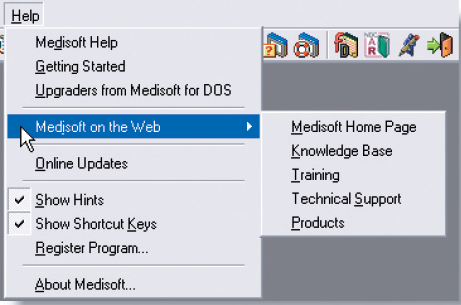
Figure 3-26 Medisoft on the Web submenu
2. Enter transactions in the search box.
3. Select Medisoft on the Search Within drop-down list.
4. Accept the All Categories entry.
5. Click the Search button.
6. FAQs, or Frequently Asked Questions, appear at the top of the list of articles.
7. Select an article, and click on the title to read it.
8. Click the Close box to exit the Medisoft Knowledge Base. Terminate your Internet connection, if appropriate.
1. Access the Internet. Click Medisoft on the Web Knowledge Base option on the Help menu (see Figure 3-26). The Knowledge Base area of the website is displayed.
Figure 3-26 Medisoft on the Web submenu
2. Enter transactions in the search box.
3. Select Medisoft on the Search Within drop-down list.
4. Accept the All Categories entry.
5. Click the Search button.
6. FAQs, or Frequently Asked Questions, appear at the top of the list of articles.
7. Select an article, and click on the title to read it.
8. Click the Close box to exit the Medisoft Knowledge Base. Terminate your Internet connection, if appropriate.
التوضيح موثّق
موثّق
موثّق
Medisoft K...

Computers in the Medical Office 6th Edition by Susan Sanderson

لماذا لم يعجبك هذا التمرين؟
أخرى 8 أحرف كحد أدنى و 255 حرفاً كحد أقصى
حرف 255






