expand icon
book Business Driven Technology 6th Edition by Paige Baltzan cover

Business Driven Technology 6th Edition by Paige Baltzan

النسخة 6الرقم المعياري الدولي: 9780073376905
book Business Driven Technology 6th Edition by Paige Baltzan cover

Business Driven Technology 6th Edition by Paige Baltzan

النسخة 6الرقم المعياري الدولي: 9780073376905
تمرين 2
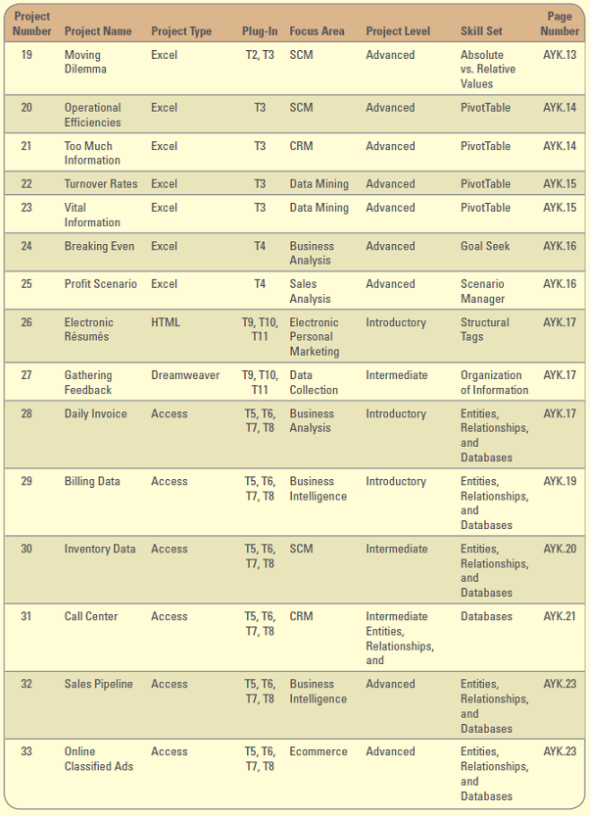
       Inventory Data  An independent retailer of mobile entertainment and wireless phones, iToys.com has built its business on offering the widest selection, expert advice, and outstanding customer service. However, iToys.com does not use a formal, consistent inventory tracking system. Periodically, an iToys.com employee visually checks to see what items are in stock. Although iToys.com does try to keep a certain level of each top seller in stock, the lack of a formal inventory tracking system has led to the overstocking of some items and understocking of other items. On occasion, a customer will request a hot item, and it is only then that iToys.com realizes that the item is out of stock. If an item is not available, iToys.com risks losing a customer to a competitor. Lately, iToys.com has become concerned with its inventory management methods. The owner of iToys.com, Dan Connolly, wants to better manage his inventory. The company receives orders by mail, by telephone, or through its website. Regardless of how the orders are received, Dan needs a database to automate the inventory checking and ordering process. Project Focus  Dan has provided you with a simplified version of the company's current system (an Excel workbook) for recording inventory and orders in an Excel spreadsheet data file AYK30_Data.xlsx. 1. Develop an ERD diagram before you begin to create the database. You will need to use the information provided here as well as the data given in the Excel workbook. 2. Create the database using a personal DBMS package (preferably Microsoft Access) that will track items (i.e., products), orders, order details, categories, suppliers, and shipping methods. 3. In addition to what is mentioned above, the database needs to track the inventory levels for each product, according to a reorder level and lead time. 4. At this time, Dan does not need information stored about the customer; he simply needs you to focus on the inventory structure. 5. Develop a query that will display the products that need to be ordered from their supplier. To complete this, you will want to compare a reorder level with how many units are in stock. 6. Develop several reports that display: a. Each product ordered by its supplier. The report should include the product name, quantity on hand, and reorder level. b. Each supplier ordered by shipping method. c. Each product that requires more than five days lead time. (Hint: You will want to create a query for this first). d. Each product ordered by category. 7. Here are some additional business rules to assist you in completing this task: a. An order must have at least one product, but can contain more than one product. b. A product can have one or more orders, but need not have any orders. c. A product must belong to one and only one category, but a category may contain many different products. d. A product can only be stocked by one supplier, but a supplier can provide more than one product. e. A supplier will use one type of shipping method, but shipping methods can be used by more than one supplier. Data File: AYK30_Data.xlsx
       Inventory Data  An independent retailer of mobile entertainment and wireless phones, iToys.com has built its business on offering the widest selection, expert advice, and outstanding customer service. However, iToys.com does not use a formal, consistent inventory tracking system. Periodically, an iToys.com employee visually checks to see what items are in stock. Although iToys.com does try to keep a certain level of each top seller in stock, the lack of a formal inventory tracking system has led to the overstocking of some items and understocking of other items. On occasion, a customer will request a hot item, and it is only then that iToys.com realizes that the item is out of stock. If an item is not available, iToys.com risks losing a customer to a competitor. Lately, iToys.com has become concerned with its inventory management methods. The owner of iToys.com, Dan Connolly, wants to better manage his inventory. The company receives orders by mail, by telephone, or through its website. Regardless of how the orders are received, Dan needs a database to automate the inventory checking and ordering process. Project Focus  Dan has provided you with a simplified version of the company's current system (an Excel workbook) for recording inventory and orders in an Excel spreadsheet data file AYK30_Data.xlsx. 1. Develop an ERD diagram before you begin to create the database. You will need to use the information provided here as well as the data given in the Excel workbook. 2. Create the database using a personal DBMS package (preferably Microsoft Access) that will track items (i.e., products), orders, order details, categories, suppliers, and shipping methods. 3. In addition to what is mentioned above, the database needs to track the inventory levels for each product, according to a reorder level and lead time. 4. At this time, Dan does not need information stored about the customer; he simply needs you to focus on the inventory structure. 5. Develop a query that will display the products that need to be ordered from their supplier. To complete this, you will want to compare a reorder level with how many units are in stock. 6. Develop several reports that display: a. Each product ordered by its supplier. The report should include the product name, quantity on hand, and reorder level. b. Each supplier ordered by shipping method. c. Each product that requires more than five days lead time. (Hint: You will want to create a query for this first). d. Each product ordered by category. 7. Here are some additional business rules to assist you in completing this task: a. An order must have at least one product, but can contain more than one product. b. A product can have one or more orders, but need not have any orders. c. A product must belong to one and only one category, but a category may contain many different products. d. A product can only be stocked by one supplier, but a supplier can provide more than one product. e. A supplier will use one type of shipping method, but shipping methods can be used by more than one supplier. Data File: AYK30_Data.xlsx
Inventory Data
An independent retailer of mobile entertainment and wireless phones, iToys.com has built its business on offering the widest selection, expert advice, and outstanding customer service. However, iToys.com does not use a formal, consistent inventory tracking system. Periodically, an iToys.com employee visually checks to see what items are in stock. Although iToys.com does try to keep a certain level of each "top seller" in stock, the lack of a formal inventory tracking system has led to the overstocking of some items and understocking of other items. On occasion, a customer will request a hot item, and it is only then that iToys.com realizes that the item is out of stock. If an item is not available, iToys.com risks losing a customer to a competitor.
Lately, iToys.com has become concerned with its inventory management methods. The owner of iToys.com, Dan Connolly, wants to better manage his inventory. The company receives orders by mail, by telephone, or through its website. Regardless of how the orders are received, Dan needs a database to automate the inventory checking and ordering process.
Project Focus
Dan has provided you with a simplified version of the company's current system (an Excel workbook) for recording inventory and orders in an Excel spreadsheet data file AYK30_Data.xlsx.
1. Develop an ERD diagram before you begin to create the database. You will need to use the information provided here as well as the data given in the Excel workbook.
2. Create the database using a personal DBMS package (preferably Microsoft Access) that will track items (i.e., products), orders, order details, categories, suppliers, and shipping methods.
3. In addition to what is mentioned above, the database needs to track the inventory levels for each product, according to a reorder level and lead time.
4. At this time, Dan does not need information stored about the customer; he simply needs you to focus on the inventory structure.
5. Develop a query that will display the products that need to be ordered from their supplier. To complete this, you will want to compare a reorder level with how many units are in stock.
6. Develop several reports that display:
a. Each product ordered by its supplier. The report should include the product name, quantity on hand, and reorder level.
b. Each supplier ordered by shipping method.
c. Each product that requires more than five days lead time. (Hint: You will want to create a query for this first).
d. Each product ordered by category.
7. Here are some additional business rules to assist you in completing this task:
a. An order must have at least one product, but can contain more than one product.
b. A product can have one or more orders, but need not have any orders.
c. A product must belong to one and only one category, but a category may contain many different products.
d. A product can only be stocked by one supplier, but a supplier can provide more than one product.
e. A supplier will use one type of shipping method, but shipping methods can be used by more than one supplier.
Data File: AYK30_Data.xlsx
التوضيح
like image
like image
no-answer
هذا السؤال ليس له إجابة موثقة من أحد الخبراء بعد، دع الذكاء الاصطناعي Copilot في كويز بلس يساعدك في إيجاد الحل.
close menu
Business Driven Technology 6th Edition by Paige Baltzan
cross icon