expand icon
book Business Driven Technology 6th Edition by Paige Baltzan cover

Business Driven Technology 6th Edition by Paige Baltzan

Edition 6ISBN: 9780073376905
book Business Driven Technology 6th Edition by Paige Baltzan cover

Business Driven Technology 6th Edition by Paige Baltzan

Edition 6ISBN: 9780073376905
Exercise 141
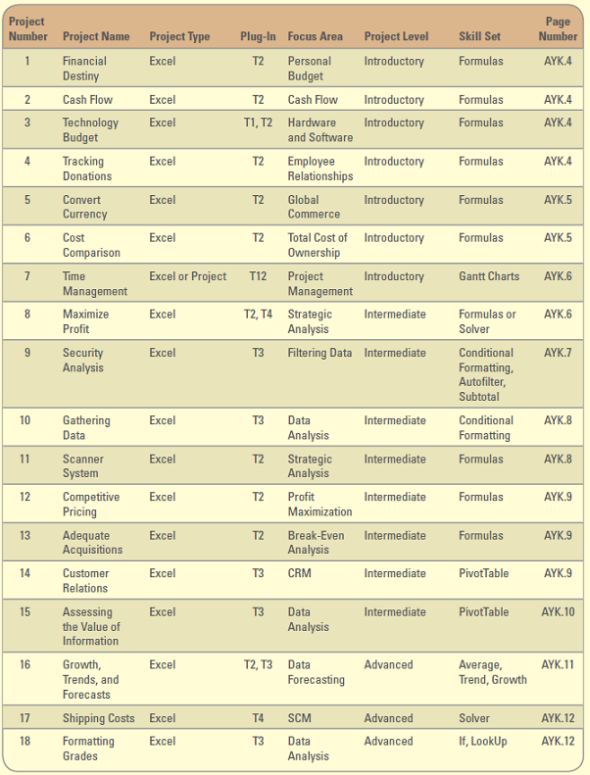
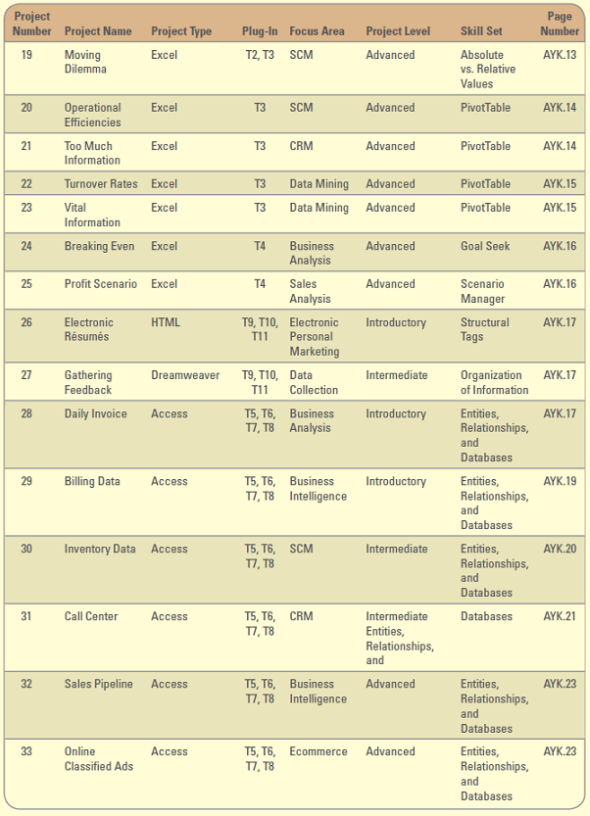
       Security Analysis  SecureWorks Inc. is a small computer security contractor that provides computer security analysis, design, and software implementation for the U.S. government and commercial clients. SecureWorks competes for both private and U.S. government computer security contract work by submitting detailed bids outlining the work the company will perform if awarded the contracts. Because all of the work involves computer security, a highly sensitive area, almost all of SecureWorks tasks require access to classified material or company confidential documents. Consequently, all of the security engineers (simply known as engineers within the company) have U.S. government clearances of either Secret or Top Secret. Some have even higher clearances for the 2 percent of SecureWorks work that involves so-called black box security work. Most of the employees also hold clearances because they must handle classified documents. Leslie Mamalis is SecureWorks' human resources (HR) manager. She maintains all employee records and is responsible for semiannual review reports, payroll processing, personnel records, recruiting data, employee training, and pension option information. At the heart of an HR system are personnel records. Personnel record maintenance includes activities such as maintaining employee records, tracking cost center data, recording and maintaining pension information, and absence and sick leave record keeping. While most of this information resides in sophisticated database systems, Leslie maintains a basic employee worksheet for quick calculations and ad hoc report generation. Because SecureWorks is a small company, Leslie can take advantage of Excel's excellent list management capabilities to satisfy many of her personnel information management needs. Project Focus  Leslie has asked you to assist with a number of functions (she has provided you with a copy of her trusted personnel data file, AYK9_Data.xlsx): 1. Copy the worksheet Data to a new worksheet called Sort. Sort the employee list in ascending order by department, then by last name, then by first name. 2. Copy the worksheet Data to a new worksheet called Autofilter. Using the Autofilter feature, create a custom filter that will display employees whose birth date is greater than or equal to 1/1/1965 and less than or equal to 12/31/1975. 3. Copy the worksheet Data to a new worksheet called Subtotal. Using the subtotal feature create a sum of the salary for each department. 4. Copy the worksheet Data to a new worksheet called Formatting. Using the salary column, change the font color to red if the cell value is greater than or equal to 55000. You must use the conditional formatting feature to complete this step. Data File: AYK9_Data.xlsx
       Security Analysis  SecureWorks Inc. is a small computer security contractor that provides computer security analysis, design, and software implementation for the U.S. government and commercial clients. SecureWorks competes for both private and U.S. government computer security contract work by submitting detailed bids outlining the work the company will perform if awarded the contracts. Because all of the work involves computer security, a highly sensitive area, almost all of SecureWorks tasks require access to classified material or company confidential documents. Consequently, all of the security engineers (simply known as engineers within the company) have U.S. government clearances of either Secret or Top Secret. Some have even higher clearances for the 2 percent of SecureWorks work that involves so-called black box security work. Most of the employees also hold clearances because they must handle classified documents. Leslie Mamalis is SecureWorks' human resources (HR) manager. She maintains all employee records and is responsible for semiannual review reports, payroll processing, personnel records, recruiting data, employee training, and pension option information. At the heart of an HR system are personnel records. Personnel record maintenance includes activities such as maintaining employee records, tracking cost center data, recording and maintaining pension information, and absence and sick leave record keeping. While most of this information resides in sophisticated database systems, Leslie maintains a basic employee worksheet for quick calculations and ad hoc report generation. Because SecureWorks is a small company, Leslie can take advantage of Excel's excellent list management capabilities to satisfy many of her personnel information management needs. Project Focus  Leslie has asked you to assist with a number of functions (she has provided you with a copy of her trusted personnel data file, AYK9_Data.xlsx): 1. Copy the worksheet Data to a new worksheet called Sort. Sort the employee list in ascending order by department, then by last name, then by first name. 2. Copy the worksheet Data to a new worksheet called Autofilter. Using the Autofilter feature, create a custom filter that will display employees whose birth date is greater than or equal to 1/1/1965 and less than or equal to 12/31/1975. 3. Copy the worksheet Data to a new worksheet called Subtotal. Using the subtotal feature create a sum of the salary for each department. 4. Copy the worksheet Data to a new worksheet called Formatting. Using the salary column, change the font color to red if the cell value is greater than or equal to 55000. You must use the conditional formatting feature to complete this step. Data File: AYK9_Data.xlsx
Security Analysis
SecureWorks Inc. is a small computer security contractor that provides computer security analysis, design, and software implementation for the U.S. government and commercial clients. SecureWorks competes for both private and U.S. government computer security contract work by submitting detailed bids outlining the work the company will perform if awarded the contracts. Because all of the work involves computer security, a highly sensitive area, almost all of SecureWorks tasks require access to classified material or company confidential documents. Consequently, all of the security engineers (simply known as "engineers" within the company) have U.S. government clearances of either Secret or Top Secret. Some have even higher clearances for the 2 percent of SecureWorks work that involves so-called "black box" security work. Most of the employees also hold clearances because they must handle classified documents.
Leslie Mamalis is SecureWorks' human resources (HR) manager. She maintains all employee records and is responsible for semiannual review reports, payroll processing, personnel records, recruiting data, employee training, and pension option information. At the heart of an HR system are personnel records. Personnel record maintenance includes activities such as maintaining employee records, tracking cost center data, recording and maintaining pension information, and absence and sick leave record keeping. While most of this information resides in sophisticated database systems, Leslie maintains a basic employee worksheet for quick calculations and ad hoc report generation. Because SecureWorks is a small company, Leslie can take advantage of Excel's excellent list management capabilities to satisfy many of her personnel information management needs.
Project Focus
Leslie has asked you to assist with a number of functions (she has provided you with a copy of her "trusted" personnel data file, AYK9_Data.xlsx):
1. Copy the worksheet Data to a new worksheet called Sort. Sort the employee list in ascending order by department, then by last name, then by first name.
2. Copy the worksheet Data to a new worksheet called Autofilter. Using the Autofilter feature, create a custom filter that will display employees whose birth date is greater than or equal to 1/1/1965 and less than or equal to 12/31/1975.
3. Copy the worksheet Data to a new worksheet called Subtotal. Using the subtotal feature create a sum of the salary for each department.
4. Copy the worksheet Data to a new worksheet called Formatting. Using the salary column, change the font color to red if the cell value is greater than or equal to 55000. You must use the conditional formatting feature to complete this step.
Data File: AYK9_Data.xlsx
Explanation
Verified
like image
like image

1.
Sort tool can be assessed from the "S...

close menu
Business Driven Technology 6th Edition by Paige Baltzan
cross icon