







 Chat with AI


QuickBooks Pro 2013 14th Edition by Janet Horne
Edition 14ISBN: 978-0133023350QuickBooks Pro 2013 14th Edition by Janet Horne
Edition 14ISBN: 978-0133023350 Exercise 1
YOUR NAME RESORT CLOTHING
Chapter 7 continues with the end-of-period adjustments, bank and credit card reconciliations, archive disks, and closing the period for Your Name Resort Clothing. The company does use a certified public accountant for guidance and assistance with appropriate accounting procedures. The CPA has provided information for Karen to use for adjusting entries, etc.
INSTRUCTIONS
Continue to use the copy of Your Name Resort Clothing you used in the previous chapters. Open the company-the file used is Clothing.qbw. Record the adjustments and other transactions as you were instructed in the chapter. Always read the transaction carefully and review the Chart of Accounts when selecting transaction accounts. Print the reports and journals as indicated and resize columns for a full display of information.
RECORD TRANSACTIONS
January 31, 2013 -Enter the following:
Change the names and/or the account numbers of the following accounts.
6260 - Printing and Reproduction to 6260 Printing and Duplication
6350 - Travel Ent to 6350 - Travel Expenses
3010 - Your Name Olsen, Capital to 3100 - Your Last Name Olsen, Capital
Remember to use your actual last name.
Add the following accounts:
Equity account 3110 - First and Last Name, Capital (subaccount of 3100)
Remember to use both your real first and last name.
Equity account 3120 - Karen Olsen, Capital (subaccount of 3100)
Change the following accounts:
3011 - Your Name, Investment to 3111 - First and Last Name, Investment (subaccount of 31 10 )
Remember to use both your real first and last name.
3013 - Your Name, Drawing to 3112 - First and Last Name, Drawing (subaccount of 3110)
Remember to use both your real first and last name.
3012 - Karen Olsen, Investment to 3121 - Karen Olsen, Investment (subaccount of 3120)
3014 - Karen Olsen, Drawing to 3122 Karen Olsen, - Drawing (subaccount of 3120)
6422 - Office to 6422 - Office Supplies (subaccount of 6420 - Supplies Expense)
Make the following accounts inactive:
6291 - Building Repairs
6351 - Entertainment
Delete the following accounts:
6182 - Disability Insurance
6213-Mortgage
6823 - Property
Print an Account Listing in Landscape orientation
Do not show inactive accounts (If necessary, click Include inactive to remove the check mark)
Click the Reports button at the bottom of the Chart of Accounts, and click Account Listing to display the report
Resize the columns to display the Account Names in full and to hide the columns for Description, Accnt. #, and Tax Line
Change the Header/Footer so the report date is January 31, 2013
Print the report
Create a Fixed Asset Item List for:
Asset Name/Number. Office Equipment, Item is: New, Purchase and Asset Description: Office Equipment, Date: 12/31/12, Cost: $8,000, Asset Account: 1510
Asset Name/Number: Store Fixtures, Item is: New, Purchase and Asset Description: Store Fixtures, Date: 12/31/12, Cost: $9,500, Asset Account: 1520
Enter adjusting entries in the Journal and use the memo Adjusting Entry for the following:
Office Supplies Used, the amount used is $35
Sales Supplies Used, account balance (on hand) at the end of the month is $1,400
Record a compound entry for depreciation for the month: Office Equipment, $66.67 and Store Fixtures, $79.17
The amount of insurance remaining in the Prepaid Insurance account is for six months of liability insurance. Record the liability insurance expense for the month
Each owner withdrew $500. (Memo: January Withdrawal) Print Check Nos. 7 and 8 for the owners' withdrawals.
Prepare Bank Reconciliation and Enter Adjustments for the Reconciliation: (Refer to the chapter for appropriate Memo notations)
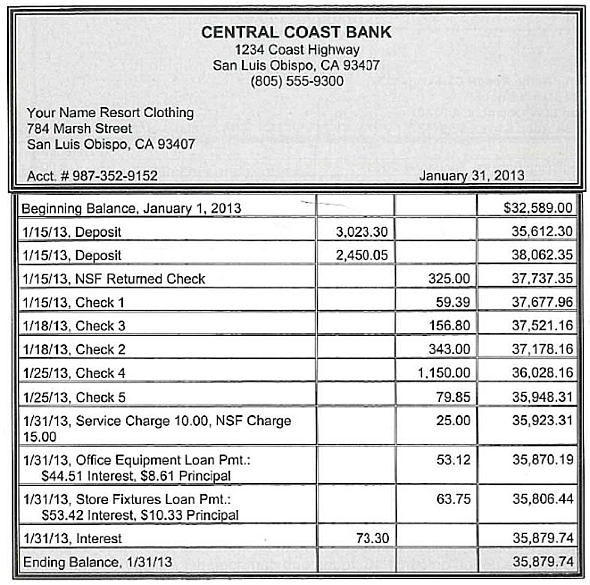
Print a Detailed Reconciliation Report in Portrait. Adjust column widths so the report fits on one page
Reconcile the Visa account using the statement on the following page
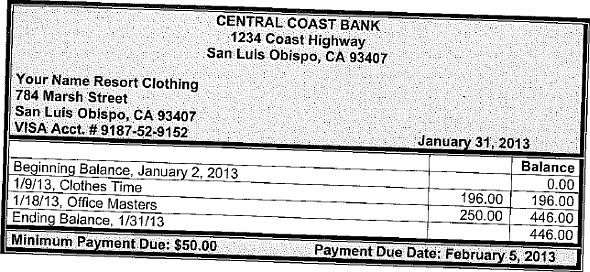
Print a Detailed Reconciliation Report in Portrait. Pay Central Coast Bank for the Visa bill using Check No. 9. Print Check No. 9
After completing the Visa reconciliation, distribute capital to each owner: divide the balance of 3100 - Your Last Name Olsen, Capital - Other equally between the two partners. (View a Standard Balance Sheet to see the balance of the Capital - Other account.) Record an entry to transfer each owner's portion of the Capital Other to the individual capital accounts. (Memo: Transfer Capital to Partners) Remember, this is not an adjusting entry
Divide in half and transfer Net Income/Retained Earnings into owners' individual Capital accounts. Remember, this is an adjusting entry
Close Drawing accounts into owner's individual Capital accounts
Prepare an archive copy of the company file
Close the period as of January 31, 2013 (Do not assign passwords)
After closing the period on 01/31/13, discovered an error in the amount of Office Supplies and Sales Supplies: Transfer $40 from Office Supplies to Sales Supplies
After closing the period on 01/31/13, found one damaged tie. Adjust the quantity of ties on 01/31/13 using the Expense account 6190 Merchandise Adjustments
Change the net income/retained earnings adjustment to reflect the merchandise adjustment for the ties
Backup the company and redo the archive copy of the company file as well
Print the Journal for January, 2013 (Landscape orientation, Fit to one page wide)
Print the following reports:
Trial Balance, January 1-31, 2013
Profit and Loss Statement, January 31, 2013
Balance Sheet, January 31, 2013
NAME_________________
TRANSMITTAL
CHAPTER 7: YOUR NAME RESORT CLOTHING
Attach the following documents and reports:
Account Listing
Check No. 7: Your First and Last Name
Check No. 8: Karen Olsen
Bank Reconciliation Detail Report, January 31, 2013
Visa Reconciliation Detail Report, January 31, 2013
Check No. 9: Central Coast Bank
Journal, January 1-31, 2013
Trial Balance, January 31, 2013
Profit and Loss, January, 2013
Balance Sheet, January 31, 2013
Chapter 7 continues with the end-of-period adjustments, bank and credit card reconciliations, archive disks, and closing the period for Your Name Resort Clothing. The company does use a certified public accountant for guidance and assistance with appropriate accounting procedures. The CPA has provided information for Karen to use for adjusting entries, etc.
INSTRUCTIONS
Continue to use the copy of Your Name Resort Clothing you used in the previous chapters. Open the company-the file used is Clothing.qbw. Record the adjustments and other transactions as you were instructed in the chapter. Always read the transaction carefully and review the Chart of Accounts when selecting transaction accounts. Print the reports and journals as indicated and resize columns for a full display of information.
RECORD TRANSACTIONS
January 31, 2013 -Enter the following:
Change the names and/or the account numbers of the following accounts.
6260 - Printing and Reproduction to 6260 Printing and Duplication
6350 - Travel Ent to 6350 - Travel Expenses
3010 - Your Name Olsen, Capital to 3100 - Your Last Name Olsen, Capital
Remember to use your actual last name.
Add the following accounts:
Equity account 3110 - First and Last Name, Capital (subaccount of 3100)
Remember to use both your real first and last name.
Equity account 3120 - Karen Olsen, Capital (subaccount of 3100)
Change the following accounts:
3011 - Your Name, Investment to 3111 - First and Last Name, Investment (subaccount of 31 10 )
Remember to use both your real first and last name.
3013 - Your Name, Drawing to 3112 - First and Last Name, Drawing (subaccount of 3110)
Remember to use both your real first and last name.
3012 - Karen Olsen, Investment to 3121 - Karen Olsen, Investment (subaccount of 3120)
3014 - Karen Olsen, Drawing to 3122 Karen Olsen, - Drawing (subaccount of 3120)
6422 - Office to 6422 - Office Supplies (subaccount of 6420 - Supplies Expense)
Make the following accounts inactive:
6291 - Building Repairs
6351 - Entertainment
Delete the following accounts:
6182 - Disability Insurance
6213-Mortgage
6823 - Property
Print an Account Listing in Landscape orientation
Do not show inactive accounts (If necessary, click Include inactive to remove the check mark)
Click the Reports button at the bottom of the Chart of Accounts, and click Account Listing to display the report
Resize the columns to display the Account Names in full and to hide the columns for Description, Accnt. #, and Tax Line
Change the Header/Footer so the report date is January 31, 2013
Print the report
Create a Fixed Asset Item List for:
Asset Name/Number. Office Equipment, Item is: New, Purchase and Asset Description: Office Equipment, Date: 12/31/12, Cost: $8,000, Asset Account: 1510
Asset Name/Number: Store Fixtures, Item is: New, Purchase and Asset Description: Store Fixtures, Date: 12/31/12, Cost: $9,500, Asset Account: 1520
Enter adjusting entries in the Journal and use the memo Adjusting Entry for the following:
Office Supplies Used, the amount used is $35
Sales Supplies Used, account balance (on hand) at the end of the month is $1,400
Record a compound entry for depreciation for the month: Office Equipment, $66.67 and Store Fixtures, $79.17
The amount of insurance remaining in the Prepaid Insurance account is for six months of liability insurance. Record the liability insurance expense for the month
Each owner withdrew $500. (Memo: January Withdrawal) Print Check Nos. 7 and 8 for the owners' withdrawals.
Prepare Bank Reconciliation and Enter Adjustments for the Reconciliation: (Refer to the chapter for appropriate Memo notations)
Print a Detailed Reconciliation Report in Portrait. Adjust column widths so the report fits on one page
Reconcile the Visa account using the statement on the following page
Print a Detailed Reconciliation Report in Portrait. Pay Central Coast Bank for the Visa bill using Check No. 9. Print Check No. 9
After completing the Visa reconciliation, distribute capital to each owner: divide the balance of 3100 - Your Last Name Olsen, Capital - Other equally between the two partners. (View a Standard Balance Sheet to see the balance of the Capital - Other account.) Record an entry to transfer each owner's portion of the Capital Other to the individual capital accounts. (Memo: Transfer Capital to Partners) Remember, this is not an adjusting entry
Divide in half and transfer Net Income/Retained Earnings into owners' individual Capital accounts. Remember, this is an adjusting entry
Close Drawing accounts into owner's individual Capital accounts
Prepare an archive copy of the company file
Close the period as of January 31, 2013 (Do not assign passwords)
After closing the period on 01/31/13, discovered an error in the amount of Office Supplies and Sales Supplies: Transfer $40 from Office Supplies to Sales Supplies
After closing the period on 01/31/13, found one damaged tie. Adjust the quantity of ties on 01/31/13 using the Expense account 6190 Merchandise Adjustments
Change the net income/retained earnings adjustment to reflect the merchandise adjustment for the ties
Backup the company and redo the archive copy of the company file as well
Print the Journal for January, 2013 (Landscape orientation, Fit to one page wide)
Print the following reports:
Trial Balance, January 1-31, 2013
Profit and Loss Statement, January 31, 2013
Balance Sheet, January 31, 2013
NAME_________________
TRANSMITTAL
CHAPTER 7: YOUR NAME RESORT CLOTHING
Attach the following documents and reports:
Account Listing
Check No. 7: Your First and Last Name
Check No. 8: Karen Olsen
Bank Reconciliation Detail Report, January 31, 2013
Visa Reconciliation Detail Report, January 31, 2013
Check No. 9: Central Coast Bank
Journal, January 1-31, 2013
Trial Balance, January 31, 2013
Profit and Loss, January, 2013
Balance Sheet, January 31, 2013
Explanation


This question doesn’t have an expert verified answer yet, let Quizplus AI Copilot help.

QuickBooks Pro 2013 14th Edition by Janet Horne

Why don’t you like this exercise?
Other Minimum 8 character and maximum 255 character
Character 255






