A security engineer noticed an anomaly within a company EC2 instance as shown in the image. The engineer must now investigate what is causing the anomaly. 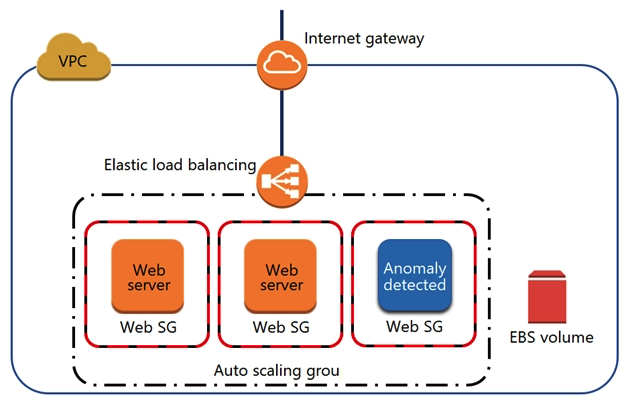 What are the MOST effective steps to take to ensure that the instance is not further manipulated, while allowing the engineer to understand what happened?
A) Remove the instance from the Auto Scaling group. Place the instance within an isolation security group, detach the EBS volume, launch an EC2 instance with a forensic toolkit, and attach the EBS volume to investigate.
B) Remove the instance from the Auto Scaling group and the Elastic Load Balancer. Place the instance within an isolation security group, launch an EC2 instance with a forensic toolkit, and allow the forensic toolkit image to connect to the suspicious instance to perform the investigation.
C) Remove the instance from the Auto Scaling group. Place the instance within an isolation security group, launch an EC2 instance with a forensic toolkit, and use the forensic toolkit image to deploy an ENI as a network span port to inspect all traffic coming from the suspicious instance.
D) Remove the instance from the Auto Scaling group and the Elastic Load Balancer. Place the instance within an isolation security group, make a copy of the EBS volume from a new snapshot, launch an EC2 instance with a forensic toolkit, and attach the copy of the EBS volume to investigate.
Correct Answer:

Verified
Q233: A company's security information events management (SIEM)
Q234: An organizational must establish the ability to
Q235: A company uses HTTP Live Streaming (HLS)
Q236: A company plans to use custom AMIs
Q237: Two Amazon EC2 instances in different subnets
Q239: A company's data lake uses Amazon S3
Q240: A company's Chief Security Officer has requested
Q241: An ecommerce website was down for 1 hour
Q242: A company is hosting multiple applications within
Q243: Users report intermittent availability of a web
Unlock this Answer For Free Now!
View this answer and more for free by performing one of the following actions

Scan the QR code to install the App and get 2 free unlocks

Unlock quizzes for free by uploading documents