Jan asked you to create a new Select List custom field called Department for his project MCAS. You created the field in the morning. In the afternoon, Jan notes that his Jira dashboard is not showing the field correctly. He asks to help him troubleshoot. View the Exhibit to see Jan's entire dashboard. The first gadget shows 26 issues in the project by Status. The second gadget shows that there are three issues that have the new Department field set. The last gadget shows "No Data Available". The filter query for that gadget is "project=MCAS and Department is empty." 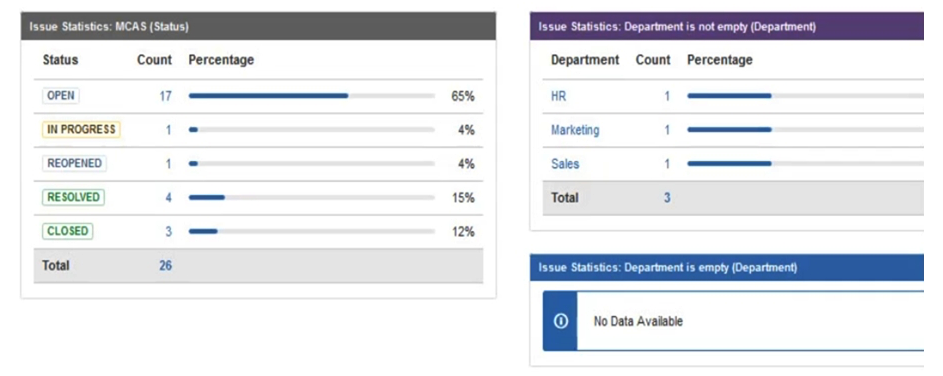 Why does Jan's gadget say "No Data Available"?
A) The field is marked Optional in the Field Configuration.
B) Jan does not have the proper Browse permissions.
C) The field context on the Department field was not set to allow empty values.
D) You created the field Department but did not re-index the MCAS project.
E) The JQL query for the filter is not valid.
F) There is issue security on the issues.
Correct Answer:

Verified
Q1: Your user directories are configured as shown:
Q2: After a recent upgrade to your Jira
Q3: You are moving a workflow from your
Q5: Your HR project has two issue types:
Q6: A team complains that many of their
Q7: Tom has asked you why the numbers
Q8: You want to introduce Jira to your
Q9: You install a new Jira instance using
Q10: The configuration details of an SMTP Mail
Q11: Beehive Bank wants to implement Jira with
Unlock this Answer For Free Now!
View this answer and more for free by performing one of the following actions

Scan the QR code to install the App and get 2 free unlocks

Unlock quizzes for free by uploading documents